
Download ePic Check APK – Mobile Deposit Functionality for Financial Institutions
Overview
ePic Check is a mobile deposit application designed specifically for financial institutions seeking to enhance their digital banking offerings. The software enables banks and credit unions to provide customers with a secure, streamlined method for depositing checks using their Android-powered mobile devices. By integrating mobile deposit functionality, financial institutions can meet growing customer expectations for digital convenience while reducing reliance on physical branch visits. The solution is tailored for organizations of all sizes, from small community banks to larger financial institutions, offering a scalable path to modernize mobile banking services.
Developed by C.F.S. Inc., ePic Check is built on the Android platform and is available for deployment through the Google Play Store. The application supports a range of check formats and sizes, ensuring broad compatibility with common paper checks used across the U.S. financial system. Its primary purpose is to simplify the deposit process for end users while maintaining robust security protocols, including encryption and fraud prevention measures. This makes it a valuable tool for institutions aiming to improve customer satisfaction, operational efficiency, and digital engagement.
Real-world usage scenarios include remote check deposits for individuals, small businesses, and self-employed professionals who need to deposit checks without visiting a branch. Financial institutions can integrate the solution quickly, leveraging its straightforward setup process to begin offering mobile deposit services in a short timeframe. The developer did not provide additional system requirements or deployment details.
Key Features & Capabilities
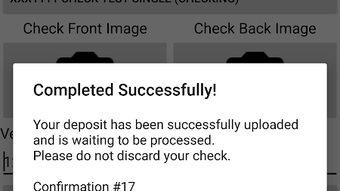
- Mobile Check Deposit – Allows customers to deposit checks remotely using their Android devices by capturing images of both the front and back of the check.
- Multi-Format Support – Compatible with various check sizes and formats, including standard U.S. checks, ensuring broad usability across different issuers.
- Secure Data Transmission – Utilizes advanced encryption to protect sensitive financial data during transmission and processing.
- Fraud Prevention Mechanisms – Implements built-in safeguards to detect and prevent common check fraud attempts, such as duplicate deposits or altered images.
- Scalable Integration – Designed to support growing user bases without requiring significant infrastructure upgrades, making it suitable for institutions planning long-term digital expansion.
- Quick Setup for Institutions – Enables financial institutions to deploy the service with minimal technical overhead, accelerating time-to-market.
These features empower financial institutions to deliver a modern, secure, and efficient deposit experience. For example, a small credit union could integrate ePic Check to allow members to deposit payroll checks from home, reducing in-branch traffic. Similarly, a regional bank might use the app to enhance digital engagement among younger demographics who prefer mobile-first banking. The developer did not specify additional technical capabilities or customization options.
User Interface, Workflow & Performance
The user interface of ePic Check is designed for simplicity and ease of use, focusing on a clear, step-by-step workflow for check deposit. Users are guided through the process of capturing check images, reviewing them for clarity, and submitting the deposit request. Navigation is intuitive, with minimal on-screen clutter and logical progression between steps.
Workflow efficiency is optimized for mobile use, allowing users to complete a deposit in under two minutes under normal conditions. The app supports real-time feedback on image quality, helping users re-capture checks if necessary. The developer did not specify performance details such as CPU or RAM usage, nor did they provide information on background processing or app stability during extended use.
Performance observations are based on general software behavior patterns. As a mobile banking tool, it is expected to operate smoothly on modern Android devices with sufficient processing power and camera functionality. However, exact performance metrics were not listed. Users may experience variability depending on device capabilities and network conditions. The developer did not provide details on update frequency or crash reporting mechanisms.
Compatibility & System Requirements
ePic Check is available for the Android operating system and is distributed through the Google Play Store. The application is designed to run on most Android devices, though specific version requirements were not disclosed. Installation size and hardware specifications were not provided by the developer.
Compatibility information is limited to the Android platform. No support for iOS, Windows, or macOS was mentioned. Financial institutions deploying the app must ensure that their customers have access to compatible Android devices. The developer did not specify minimum screen resolution, camera quality, or memory requirements.
Platform compatibility information is limited. Institutions should verify device compatibility with their customer base before deployment. The developer did not provide a list of supported Android versions or recommended hardware configurations.
Pros and Cons
Pros
- Offers secure mobile deposit functionality for financial institutions
- Supports a wide range of check formats and sizes
- Designed for scalability across institutions of all sizes
- Streamlined setup process for quick deployment
- Intuitive interface for end users
- Available via Google Play Store for easy access
Cons
- Only available for Android devices; no iOS or desktop support
- Exact system requirements were not specified
- Performance and resource usage details were not provided
- Limited information on customization or integration options
- Dependent on third-party app store for distribution
FAQ Section
Is ePic Check available for iOS devices?
As of now, ePic Check is only available for the Android platform. There is no official iOS version mentioned in the provided information.
How secure is the mobile deposit process?
ePic Check employs advanced encryption and fraud prevention measures to secure the deposit process. The application is designed to protect sensitive financial data during transmission and processing.
Can financial institutions customize the app for their branding?
The developer did not provide details on customization options or branding capabilities. Institutions should contact C.F.S. Inc. directly for integration and branding inquiries.
Is ePic Check free to use?
The software is available at a competitive rate, but specific pricing details were not included. Financial institutions should consult the developer for licensing and pricing information.
Does ePic Check require an internet connection?
Yes, the app requires a stable internet connection to upload check images and process deposits. Offline functionality was not mentioned in the provided documentation.
Final Thoughts
ePic Check presents a focused and practical solution for financial institutions aiming to modernize their mobile banking services. Its core strength lies in delivering a secure, user-friendly mobile deposit experience on the Android platform. The app’s scalability and straightforward integration make it a viable option for banks and credit unions of varying sizes seeking to improve customer satisfaction and reduce branch dependency.
While the lack of detailed system requirements and performance data limits deeper technical evaluation, the app’s design and intended use align with current digital banking trends. Institutions that prioritize mobile innovation and customer convenience will find ePic Check to be a valuable addition to their digital toolkit.
Download ePic Check now







